← All work
0 → 1 Product · Automation Creations Inc.

Replacing a manual Excel workflow with an estimation tool

I built this full-stack estimator solo, from an empty repo to a deployed app. My tool replaced a structural-panel manufacturer's hand-built Excel quoting process.

Drag to compare the old spreadsheet against the new autofilled estimate.

Before After
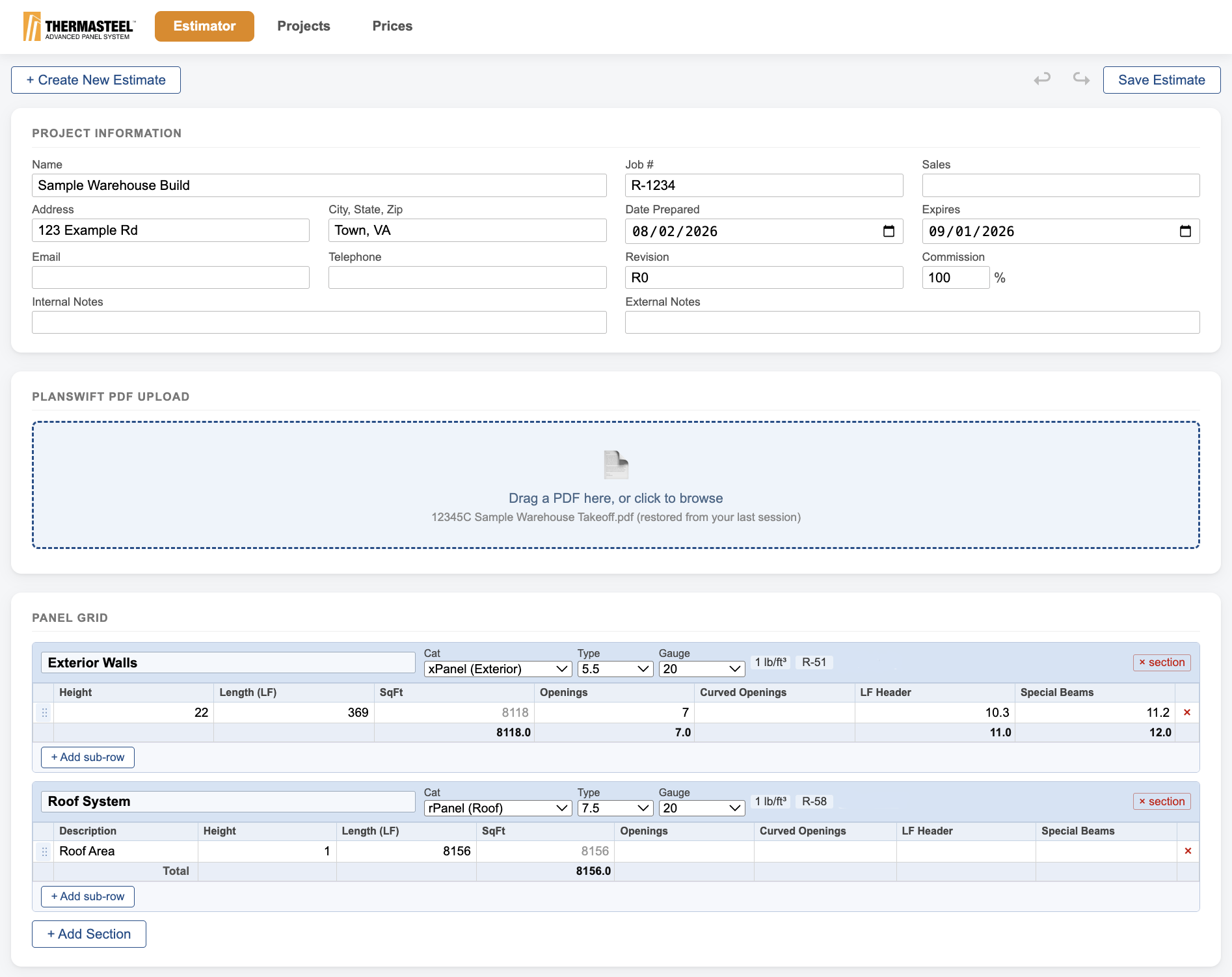
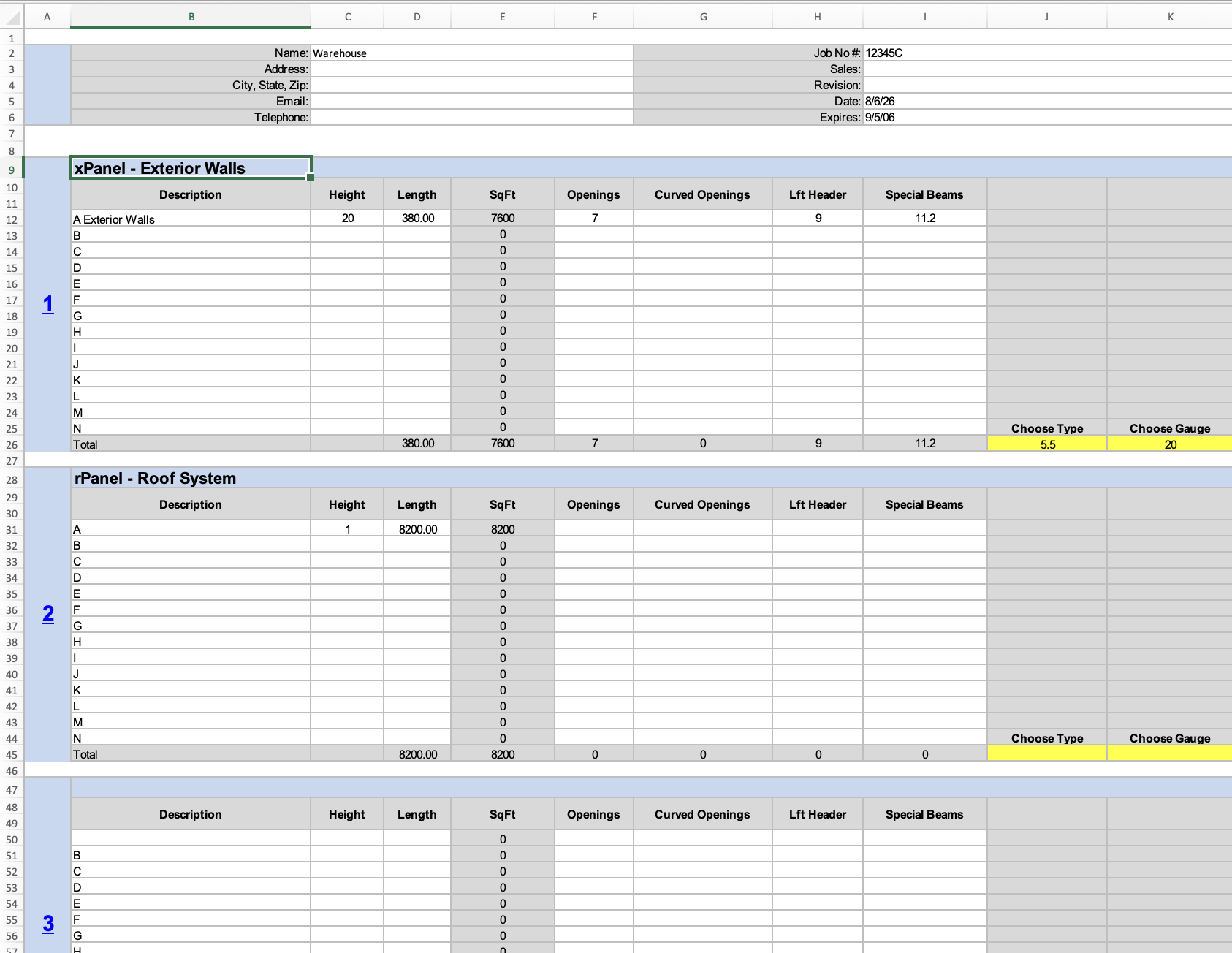
The ThermaSteel estimator, showing Estimator, Projects, and Prices navigation with a signed-in user, a project information form, a PlanSwift PDF upload area, and a pre-filled panel grid with exterior wall and roof system sections. The original Excel quoting workbook: a grid of mostly empty rows under xPanel Exterior Walls and rPanel Roof System headings, with every measurement typed in by hand and yellow Choose Type and Choose Gauge cells.
Before: Every field was typed in by hand.
Before: Type and gauge had to be chosen by hand, with no defaults.
Before: Oh no! Typing here would mess up the entire pricing formula.
After: A database with past projects and revisions.
After: New client info filled in automatically via Jotform.
After: Every field fills in automatically from the PDF. No manual entry needed.

This is the same job priced two different ways. On the left, someone typed every measurement from a PlanSwift takeoff into Excel by hand. On the right, the estimator reads that same takeoff and prices the job automatically.
Every quote was manually entered by hand.

Estimators read measurements off architectural takeoff PDFs, then applied pricing rules by hand in Excel. The process was slow, error-prone, and hard to keep consistent as prices changed.

I built the tool by validating against 300+ real historical jobs rather than from a written spec.

Three pieces, in sequence.

01

AI extraction

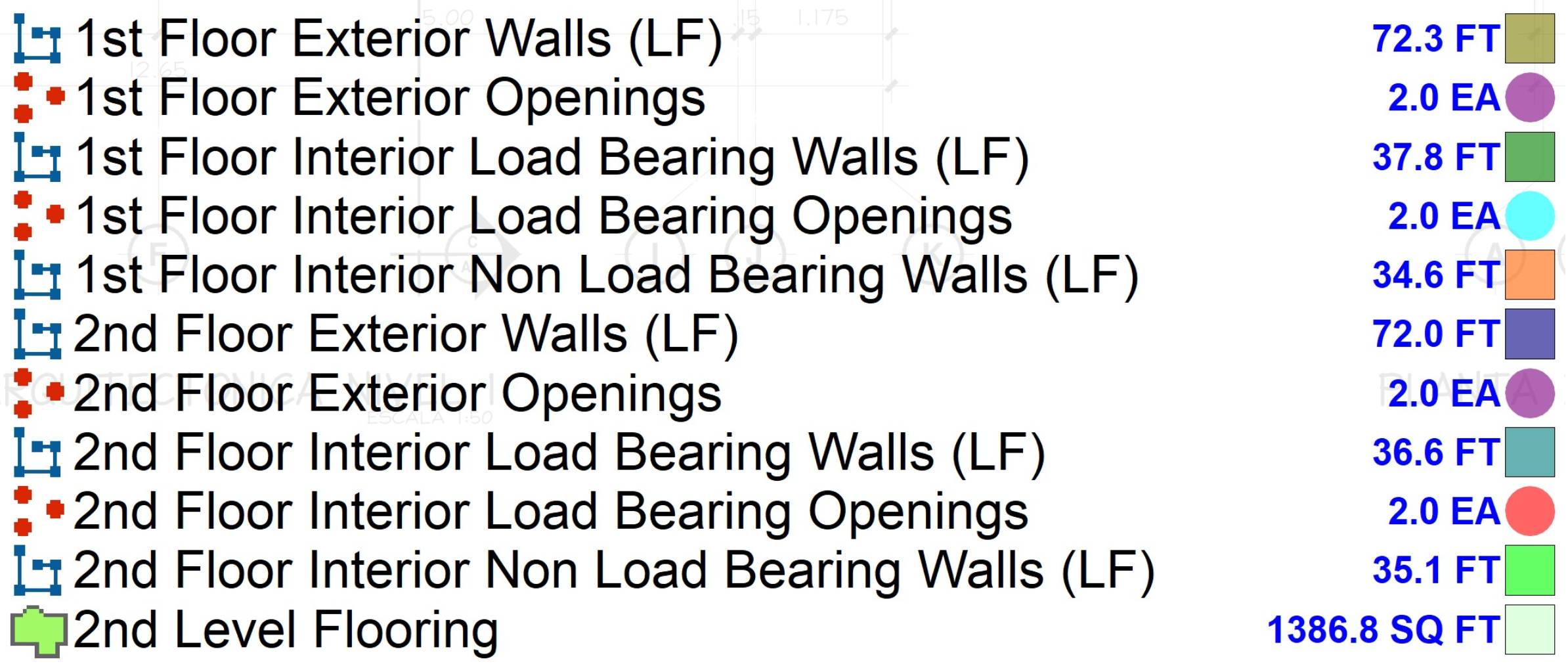
Gemini vision reads measurements straight from the legends in takeoffs.

A takeoff-drawing legend listing wall and opening measurements: lengths in feet, openings by count, each paired with a colored swatch.
02

Categorization

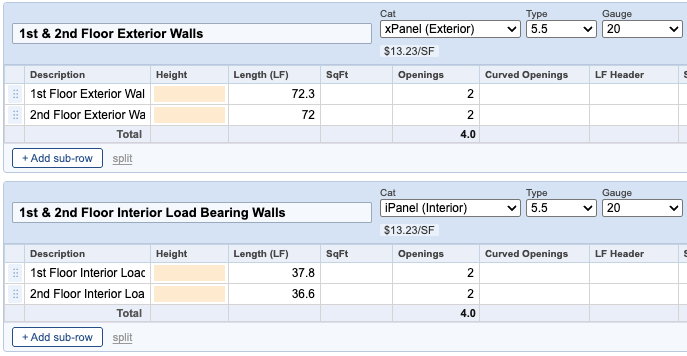
Automatically maps raw measurements to the right panel categories, handling messy labels, typos, and duplicates. The estimator can manually edit for custom decisions.

The extracted measurements mapped into categorized panel sections in the estimator, such as exterior walls and interior load-bearing walls, with category, type, and gauge already filled in.
03

Calculation engine

I reverse-engineered the legacy Excel pricing until outputs matched to the penny. I found three structurally different pricing formulas hidden behind what looked like one rule.

The estimate is one screen of a real application.

Pricing a job was the first problem. Making quotes durable, attributable, and safe to hand to a team was the rest of it.

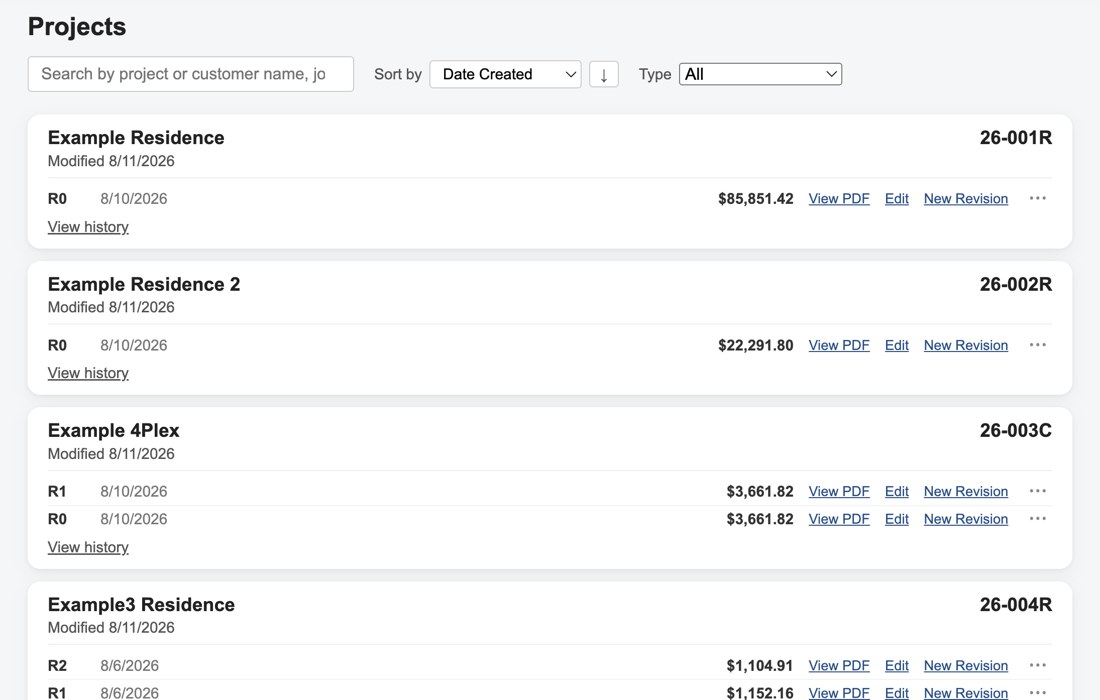
The Projects dashboard: a searchable, sortable list of saved projects (names anonymized), each showing its job number, revision history, computed price, and quick actions to view the PDF, edit, or start a new revision.
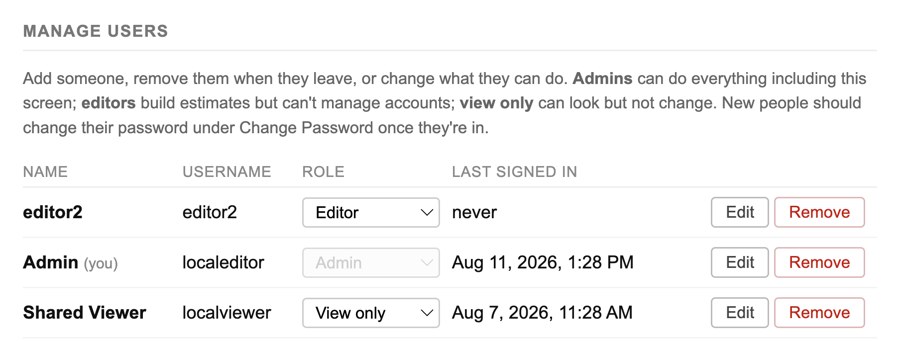
A Manage Users screen listing three accounts — an Editor, an Admin, and a Shared Viewer — each with a role dropdown, last-signed-in date, and Edit/Remove actions.
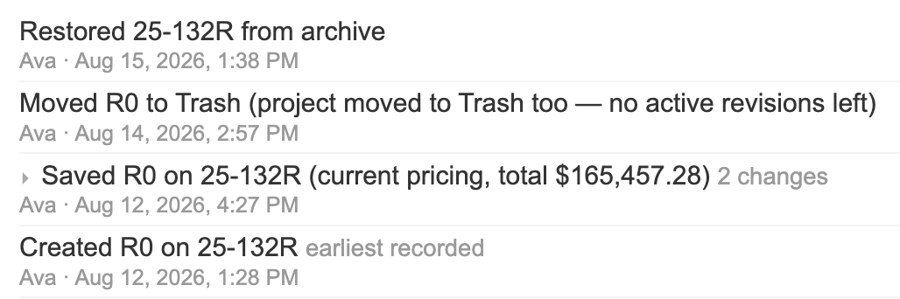
A revision history log: entries for restoring a project from archive, moving a revision to trash, saving a new revision with its total price, and creating the original revision, each timestamped and attributed to the user who made the change.

Projects and revisions

Every estimate persists as a project with its own revision history. All projects are searchable and sortable. Adding a new revision duplicates the existing project for manual alteration, under the system's current pricing.

MySQL · SQLAlchemy

Accounts and tiers

Accounts are tiered: Admin, Editor, and Viewer. Admins can add and manage the other users — guarding against the kind of errors that crept into a single shared spreadsheet.

Edit history

Changes are recorded rather than overwritten, so a quote carries its own trail of what changed and when.

Two calls that shaped the product.

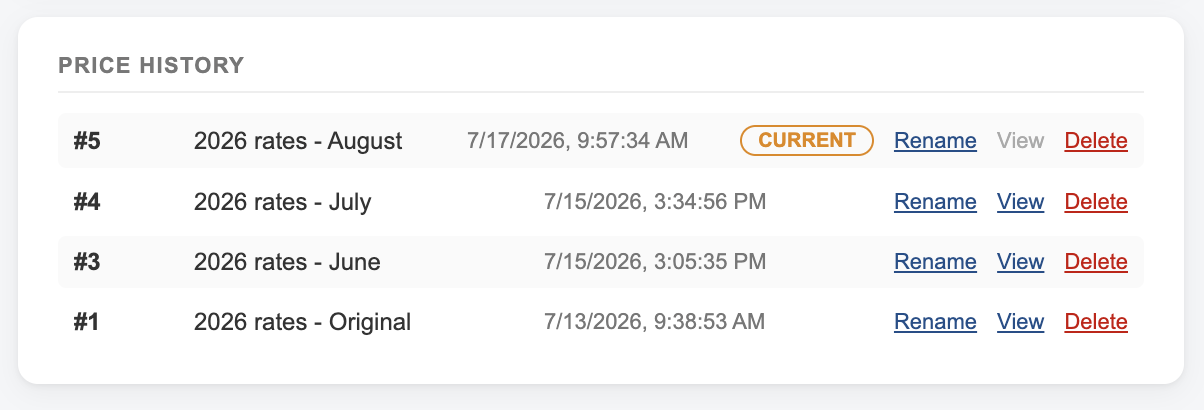
A price list's version history: five numbered rate versions, each with a label and timestamp, the current one marked and the rest read-only with view, rename, and delete actions.
Every rate change becomes a new version. Nothing gets overwritten.

I made pricing history immutable.

I designed rate tables to be versioned and append-only, so updating rates inserts a new row instead of overwriting one. "Current" comes from the latest effective date, and every past version stays read-only. Editing a saved quote forces an explicit choice between the price it was originally quoted at and today's.

Later, we need to answer one question: what did we quote this customer six months ago, and why?

Knowing when not to default.

For fields with a clear historical majority, I auto-populated the common value to save a step. But panel gauge split roughly 50/50 across the jobs I checked, so defaulting would bury a coin-flip the estimator might not notice.

Instead of auto-filling it, I highlighted the gauge field to force an explicit choice. The tool is designed to keep humans in the loop on arbitrary choices.

Validated against the company's own history.

0.5%
Maximum variance vs. historical estimates on gross square footage, across real commercial jobs
633
Regression tests built from real job data
300+
Real commercial projects validated against

The test suite locked that accuracy in. It also caught silent mispricing and category-misclassification bugs before they reached a customer.

I will harden webhook authentication and move integration configuration into tracked, documented settings.

Live in production

I also built ThermaSteel's semantic photo-search gallery, live on their site →

thermasteelinc.com/photos/photo-search-gallery/